Nyaa archive 1662673
[MTBB] Oshi no Ko - 02 (1080p)
Saved on 2023-07-29 04:10:15. This copy includes the description and comments available at capture.
Description
Oshi no Ko, episode 2
There is an alternate honorifics track in this release. Set your media player to play "enm" language tracks by default to automatically play honorifics tracks.
Please leave feedback in the comments, good or bad.
Please read this short playback guide if you want to know how to make the video and subtitles of this release look better.
Anyone wanting to do their own release is free to use any part of this torrent without permission or credit.
Comments 72
frist
sekund
turd
bob.
torn
corn
stonks
Thanks
can we reach 300 comments this time?
No, we can't.
Lets Gooooo
fast
;))
what's the point of this?
all you modern english "fansubbers" do is steal from official translation and add some unnoticeable tweaks.
Yep. If you don't like it, please feel free to watch Sentai.
> unnoticeable
> complaining
@ninjastarforcex seems significant enough to me! also tsing on top of that
thanks
only if LoliSub returns for another argument...
100 comments when?
Thanks Motbob
@ninjastarforcex yeah you wouldn't notice because you're an esl anyway
Thanks. Also, add both me and LightArrowsEXE in the screenshot. Thanks
#23
put me in the screenshot, except blur this comment and swap my avatar and username with the person above me
Thanks!
thanks bob. hey light do you still play fgo in 2023?
No OP and ED TL. Yikes. Trash.
Henlo there
I'm gone for my trip a week ago and still waiting for the 300th comment there.
Fast, thanks bob
Thanks
be the
changestreetshitter you want to see in the worldWondered why this came out fast and it turns out there weren't any song TLs. Shame.
thanks for a cute consolation
Any suggestions for the slowdown at 02:44 in with all the embedded TL subs on screen? I'm using mpv.
@ChocolateBar999 upgrade your toaster
Serious question though, what's the reasoning for not putting honorifics on the default track but actually swapping the order of first/last names of people to the way it is in Japan? It seems a tad contradictory imo.
@Shadowfury You are not japanese.
Thanks mob
Don't mind me. I'm here doing my part.
Thanks Bob! <3
@aHalokid yes
ty bobby
uwu
put me in the screenshot but photoshop out all the racial slurs i'm about to write:
@RinzImpulse A 3050ti ain't a toaster. How are encodes still aren't otomized to handle embedded TLs I have no clue.
Yeah, idk. It doesn't lag in MPC-HC with xysubfilter. I'll try to be more attentive to this in future weeks. It's obviously immersion-breaking when the whole screen is laggy.
owo
Saw the crowd and wanted to see what everyone was looking at ....
My decade-old baker can handle this sub fine. Even using the nightly version, mpv has more frequent lagging issues, unlike mpc-hc.
@motbob No worries. If I can't think of something I'll go back to mpc-hc. Plus its only really in that instant with the panning headlines at 02:44 in outside that no issues. Thanks for the great work.
@nicky_008 Good to know.
I definitely would not say that mpv is more laggy overall than MPC-HC. Hell, even the newer versions of VLC beat MPC-HC in that regard. It's just this one sign that's weird.
@JohnTitor228 You understood the complete opposite of what I meant.
@ChocolateBar999 Try disabling hardware decoding in mpv.conf in case you're currently using it (or enabling if you aren't) and see if there's any difference. You could also try switching vo=gpu-next and vo=gpu. Btw, what CPU do you have?
Edit: never mind, I'm actually also getting the slow-down at that point too... I guess Bob's typesetting is just out of this world lmao
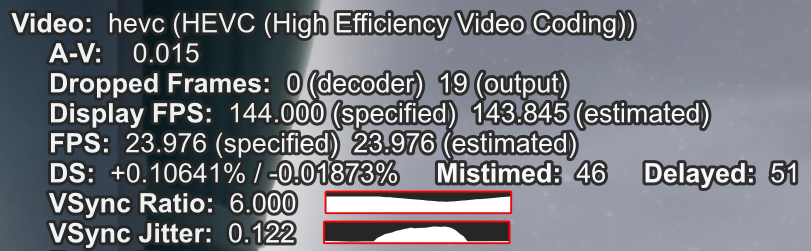
(It doesn't drop any frames if I disable the subtitles, obviously)
@light 988,765,272 is my fc if u have room
Thanks for mentioning about VLC issue also. In my case, I'd rather often have to deal with mpv more, like self-choosing appropriate settings or suitable decoders.
Seem like the fancy text is becoming a more critical problem here anyway.
simply buy a new cpu
oh ok, guess a 5800X ain't enough to display a couple of signs without lagging, my bad!
Sankyuu~~~~~
@Cavery210 we're just getting warmed up
thanks
Thank you
13900K + 4090 + 7200Mhz DDR5 ram.. and that first sign at 1:48 lags in MPV. Worst yet, is that I have blend subtitles set to video so its rendering them at 1080p only, not 4k like my display is set to.
Edit: 2:44 is even worse
I literally don't know how other than you people are using some old-ass version of libass. 1:48 has no lag, and 2:44 drops a single frame. My CPU is a 5600x.
My laptop's i5-6200U dropped 8 frames on 1:48 and 57 on 2:44 even with mpv's latest version. MPC with xysubfilter lags a bit on 1:48 and comes short of fucking shitting itself on 2:44. I do not care about this show and the people watching, so bob please keep up the excellent work.
Thanks!
kek I'm using a Ryzen 7 2700 and 1660 Ti with mpv.net and not a single dropped frame or any slowness at 1:48 and 2:44. Your setups are shit if you're having problems.
i have no problem at 1:48 at any resolution and 2:44 at 1080p. it's very laggy when i play 2:44 fullscreen at 1440p though. i have a 5800x
Aight I figured it out, in my case the slowdowns were mainly being caused by this setting:
No issues on my end, my HTPC specs are R7 2700 and Vega 64, upscaling to 4K using ewa_lanczos with SSSR, no hardware decoding.
I use video-sync=display-resample but with a TV running at 24Hz tho.
I mean, at 24Hz you're resampling 6 times less than me so it's no surprise that you don't have any issue
Yeah I'm trying to do 120Hz and upscaling it to 4k hence the slow down whenever it tries to render the signs but when I revert it back to 1080p there's no issues whatsoever.
playing this on a descend tablet, some type intense area is lagging